CO3404 Distributed Systems
CO3404 - Exam Revision 9 (03-07-2026) - Message Patterns
Block 5
Lecture 11
- Message vs event — the core distinction (command/intent vs "a fact that happened")
- Event pattern pros/cons: pub/sub, event streams, eventual consistency (RabbitMQ & Kafka)
- Be ready to compare RabbitMQ vs Kafka use-cases if asked
Block 3
Lectures 7, 8, 18
- Docker volumes vs bind mounts: difference, use-case for each (e.g. persistent DB storage vs local dev file sharing)
- Be able to read and explain a
Dockerfileline-by-line - Be able to read and explain a
docker-compose.ymlsection - Kubernetes architecture: control plane (API server, scheduler, etcd, controller manager) vs node components (kubelet, kube-proxy, container runtime)
- Be able to read and explain a Kubernetes manifest (pods, services, deployments)
Relevant Lecture
Block 5
- CO3404 Lecture 11.pdf - CO3404 Lecture 11 - Event-Driven Architecture RabbitMQ & Kafka
- CO3404 Lecture 12.pdf
Block 3
Inter-Microservice Patterns
Request-Response pattern HTTP is the simplest pattern, and given there is no intermediary it isn't typically classified as a messaging pattern. More of an interaction pattern. Tight coupling.
Point-To-Point (P2P) asynchronous message pattern. Typically implemented with a queue. Single producer and single consumer. Loose coupling
Publisher-Subscriber pattern. Typically shown as one publisher and many subscribers but also supports many publishers if required. Often implemented with RabbitMQ in a topic configuration if the system needs subscribers to subscribe based on topics, then the exchange will filter on the topic. e.g. All messages with a postcode of PR1 go to queue1.
RabbitMQ also supports a fanout exchange, where every message published to the exchange is delivered to every queue and therefore to every subscriber unlike topic exchanges, no routing key or filter is applied.
What is an Event
An event is a significant change in state or occurrence within a system that is captured and communicated as a discrete message to notify other components.
- Represents changed state i.e. OrderPlaced -> PaymentProceeded -> Shipping
- Immutable. A event is a fact that has occurred. It doesn't change.
- Context - Data describes the change
- Asynchronous - Generally published to an event bus or broker (e.g. Kafka or RabbitMQ)
Difference between Event & Message
A command/message tells another service what it should do, whereas an event announces something that has already happened. Commands represent intent; events represent facts.
i.e. An action to be taken VS an event that has already transpired.
RabbitMQ Event Driven Architecture
A broker serves as an intermediary between the message producer and message consumer.
Instead of each microservice communicating directly with every other microservice, services publish events to RabbitMQ. The broker then routes each event to the appropriate queues, where the relevant microservices consume and process them.
Benefits
- Loose coupling – Services do not need to know about one another directly.
- Scalability – Consumers can be scaled independently to handle increased workloads.
- Reliability – Messages can be persisted and retried if processing fails.
- Asynchronous communication – Producers can continue processing without waiting for consumers to complete their work.
This arch pattern is called "Event-Carried State Transfer" (ECST) using pub-sub messaging
Event Types
Thin Event
A thin event only carries a small data package such as time of the event and some sort of ID to identify.
The data payload is not sent with the event. This approach is used in "Event Notification" pattern.
- Producer publishes an event indicating that something happened, maybe also an ID and timestamp.
- State i.e. the data requires consumers to query the producer to obtain the data, typically via an API call.
Benefits
- Less data transferred via broker
- Consumer can ask for whatever data it needs from one or more APIs rather than take it all
- Popular for legacy monolithic systems that don't support thick events.
- Producer remains the sole copy of the truth.
Challenges
- Synchronous API call adds tight coupling so reduces resilience
- Slower as an event is processed then the API is called
- APIs can suffer due to concurrent burst-type requests from subscribers data on receipt of the event.
Thick Event
A Thick also known as Fat event carries all data (state). Utilised in Event-Carried State Transfer ECST architectural pattern to update subscribers to the event and its state.
Benefits
- Potentially lower latency as no additional API call.
- Asynchronous so provides loose coupling and hence more resilience to producer failure.
- Producer does not need to scale as more consumers added.
Challenges
- Likely not practical when integrating to legacy without lots of nugatory legacy improvements
- All data is always sent even if all subscribers want all the data so network and broker load can be increased
- Load on the API producer is decreased but now moved increase to broker.
Important
Both patterns are valid depending on the use case. If consumers can tolerate synchronous dependence on a producer, thin messages or synchronous calls may be preferable; whereas fat events are better suited to asynchronous, decoupled integration where resilience and autonomy are prioritised e.g. distributed systems
Kafka
Popular open-source event-based pub / sub streaming application.
- Developed by LinkedIn to track user activity on its platform.
- Very popular in event driven microservice architecture.
- Used in Netflix, Spotify, Uber, LinkedIn, Twitter, and many other well-known enterprises.
- As in RabbitMQ, Kafka uses producer/consumer model and supports producers/consumers and publisher/subscriber message/event pattern.
- In principle it is very similar to RabbitMQ but is functionally different in that it uses persistent logs instead of queues.
Captures and Stores Events
Kafka captures the required data i.e. IoT sensor data, website clips, delivery details, etc in real-time into a log, which is append-only read-only storage so maintains it's sequence and cannot be changed.
Kafka can have multiple producers and multiple consumers, similarly, it also has a feature that events that are able to be stored in numerous formats: text, xml, etc as data is serialised same as MQ.
Distributed Application
Kafka is a DA meaning that it is fault tolerant, horizontal scalable, enables parallel processing across multiple nodes.
Queue Key Differences
A basic queue has one producer and one consumer. Kafka can have multiple producers, as can MQ by utilising an exchange.
The queued message is deleted once read.
Kafka can have many consumers/subscribers to the same topic because reading the data doesn't cause it to be deleted (removed from the queue) as data is not deleted once read. Kafka events are persisted.
Unlike RabbitMQ which can be configured as a priority queue, Kafka stores events / messages as an immutable append log i.e. the order in which they come in is maintained.
Kafka consumers have an index into the log, which increments as they read messages. If they need to go back they can change the read index on the log, essentially reading and accessing that past log file. Rather than replicating data in one queue per subscriber Kafka has one copy of the events and subscribers read the events using their own offsets into the event stream.
Kafka supports data streaming e.g. data can be streamed in through a "Kafka connect" connector to a streaming data source such as a [click stream], IoT, video, etc. The stream can be processed by a consumer, then the output to another topic which is streamed back out through the "Kafka stream" e.g. IoT data streams in the consumer processes it in real time, event by event, and then streams the output through another topic to real time analytics service, or wherever required.
Note
Able to add whatever events you want to a topic from multiple producers, the consumers will filter on what they want to see based on a key of some sort, e.g., customerID.
| Feature | Kafka | RabbitMQ |
|---|---|---|
| Primary Role | Distributed event streaming platform | Message broker for reliable messaging |
| Message Storage | Persistent log (messages retained for a configurable time) | Transient by default; messages are typically deleted after acknowledgement |
| Ordering | Guaranteed within a partition; no message prioritisation | Guaranteed within a queue; supports priority queues where producers can assign message priorities |
| Replay | Supported — consumers can re-read old events | Not supported after a message has been acknowledged |
| Throughput | Extremely high (millions of messages per second) | Lower than Kafka; optimised for reliability using publisher and consumer acknowledgements |
| Consumer Scaling | Consumer groups distribute partitions across consumers for parallel processing | Multiple queues or competing consumers on the same queue (e.g. round-robin distribution) |
| Protocol | Custom binary protocol | AMQP (Advanced Message Queuing Protocol) |
| Serialization | Opaque byte arrays | Opaque byte arrays |
Summary of Patterns
Request-Response - Synchronous. Caller waits for reply. Tight Coupling. Not formally a message pattern.
- HTTP, REST, gRPC
Point-to-Point Asynchronous Messaging - One message, one consumer. Asynchronous. Message lives in a queue. Loose Coupling.
- RabbitMQ Queue, Azure Service Bus Queue, AWS Simple Queueing Service (SQS)
Publisher-Subscriber Messaging - Typically one message, many subscribers. Asynchronous. Loose Coupling. Subscribers receive independent message copies.
- Kafka Topics, RabbitMQ Fanout/Topic Exchanges
Event Notification - Event signals that something happened. Carries minimal data (e.g. ID only - thin event). Consumes typically synchronous API for state so creates tight coupling.
Event Streaming - Continuous sequence of events. Replayable, so ordering matters.
Event-Carried State Transfer - The way in which a distributed system propagates state between services without creating runtime coupling.
- Typically uses pub-sub pattern but not a requirement. Event carries the state (thick / fat events) - no callback needed.
Event-Driven Architecture - Components react to events. Loosely Coupled. Asynchronous.
- Usually pub-sub messaging.
Kafka VS RabbitMQ Use Cases
RabbitMQ
- Reliable task queues
- Background jobs
- Request–reply messaging
- Complex routing using direct, topic or fanout exchanges
- Low-latency communication between microservices
- Guaranteed delivery with acknowledgements
Examples
- Order processing
- Sending emails
- Payment processing
- Notification services
- Image processing jobs
Kafka
- High-throughput event streaming
- Persistent event storage
- Event replay
- Real-time analytics
- Log aggregation
- Event sourcing
- Processing millions of events per second
Examples
- Website clickstream analytics
- IoT sensor streams
- Fraud detection
- Recommendation systems
- Financial market data
- Monitoring and telemetry
VMs VS Containers
A VM is an isolated entire machine, with an entire operating system and applications e.g. servers or PCs. They are isolated at the hypervisor level using a type1 hypervisor as would be used in a data centre.
One problem with VMs, is that they are quite large as a result primarily from the operating system i.e. Windows Server 2025 requires 32GB of disk space, whereas even something more lightweight like ubuntu still requires about 1.9GB. This can take minutes to load and boot up, and often most of the software, and applications included go unneeded.
If a single application is wanting to be run. I.e. a personal to do list. A VM is unnecessary as it would include a lot of OS tools, and hundreds of drivers and other bloat. Programs can be written on a laptop and then a containerisation engine such as Docker, can create an image and run it as a container.
A container engine i.e. Docker, runs on a single shared OS and creates a runtime environment for the containers on its own network. Containers are isolated from each other at the process level, they are only accessible via network IP.
The DockerHub also contains thousands of pre-made and uploaded images.
Docker
Common Dockerfile Instructions
| Instruction | Purpose |
|---|---|
FROM | Select base image |
RUN | Execute build-time commands |
COPY | Copy files into image |
ADD | Similar to COPY, with extra features |
WORKDIR | Set working directory |
ENV | Set environment variables |
EXPOSE | Document listening ports |
CMD | Default runtime command |
ENTRYPOINT | Fixed executable command |
USER | Change running user |
VOLUME | Define mount point |
Example Docker YAML
Example Docker Compose
FROM python:3.12-slim

WORKDIR /app

COPY requirements.txt .

RUN pip install -r requirements.txt

COPY . .

EXPOSE 8000

CMD ["python", "app.py"]
Docker Volumes
It is possible to store data in the image, and container. For example, the data could be stored in and accessed from the container by copying them at build time or postin gdata intom them using an API. However, this makes the image and container larger, and the data is lost when the container is deleted as they are ephemeral.
There are five volume types, but the exam only focuses on two. Named Volumes and Bind Mounts. These are used for persisting or accessing data outside of the container. These are created on the host but managed by Docker.
Docker Named Volume
This syntax creates (or reuses) a named Docker volume called data and mounts it to the /usr/src/data directory inside the container.
Docker manages the storage location of the data volume on the host machine, so you do not need to specify a host directory.
Any files written to /usr/src/data are stored in the named volume, allowing the data to persist even if the container is removed and recreated.
Docker Bind Mount
A bind mount maps a directory in the container to a directory on the host machine.
- Unlike a volume, no space is created, write to one and data is seen in the other, not transferred.
Utilised when requiring a file on the host machine, that a container needs. e.g. /usr/app/stuff however the data is actually located inside the host and not the container. e.g. /home/username/stuff.
Docker Commands
docker compose build - build all images as defined in the compose yaml file.
docker compose up - start all containers.
docker compose up -d - will run the containers in detached mode
docker compose exec -it etl sh - will start the shell if sh is available: some images have bash in them as well.
docker compose -it mysql-svr bash - MySQL image has bash and sh.
docker compose exec -it caller sh - only sh as it is built from alpine. Gives access to a terminal.
docker exec - does the same thing but uses the container name not the service name.
- docker exec -it etl-cont sh
- docker exec -it mysql-cont bash
- docker exec -it caller-cont sh
docker compose down - stop and delete all containers, networks, and volumes created with up
docker system prune --all -- volumes - deletes everything
docker compose logs -f - useful to see all console log statements on cloud
docker compose restart service-name - restart a stopped container
docker compose config - check before building what the compose file looks like after.
Container Orchestration using Kubernetes
What is Kubernetes
To manage, monitor and scale many docker containers requires an orchestration application.
Docker provides Docker Swarm but the most popular container orchestration application is Kubernetes.
Kubernetes is free and open source. It's drawback however, is that the user is responsible for all infrastructure at an IaaS level. Responsibility is on the client, but they have full control.
To simplify, container deployment and management, major cloud provides also offer Kubernetes and container services as PaaS, which can be a benefit in that a lot of responsibility is passed over to the cloud providers although a disadvantage as these services are expensive and the system is effectively locked-in to that supplier to an extent.
In AWS various services are available:
- ECS - Elastic Container Service - This PaaS service is to some extent Amazon's bespoke version of Kubernetes or Docker Swarm orchestration so is a vendor lock-in option. It can enable full control by deploying containers to EC2 IaaS, so you have detailed control, or Fargate which is the PaaS option for running containers.
- EKS - Elastic Kubernetes Service - This PaaS service provides a Kubernetes orchestration platform. Deployment is via kops or CloudFormation templates so a bit more complex however has less lock-in. AWS manage the control plane (which may be paid for) and the EC2 VMs running in the cluster must be paid for.
In Azure, the Kubernetes service is AKS (Azure Kubernetes Service) and the container service is ACI (Azure Container Instances). Other services will accept container images such as Azure Webapps.
A system could have hundreds or thousands of containers so there must be a means of automating the creation, starting, stopping, and scaling of microservices. i.e. container orchestrator.
May want to scale the Containers in a VM and load balance, or scale VMs, or both.
Kubernetes works with Docker, which is what it utilises, to deploy and manage containers.
For simplicity Kubernetes is shortened to K8s (k, 8 letters, and s)
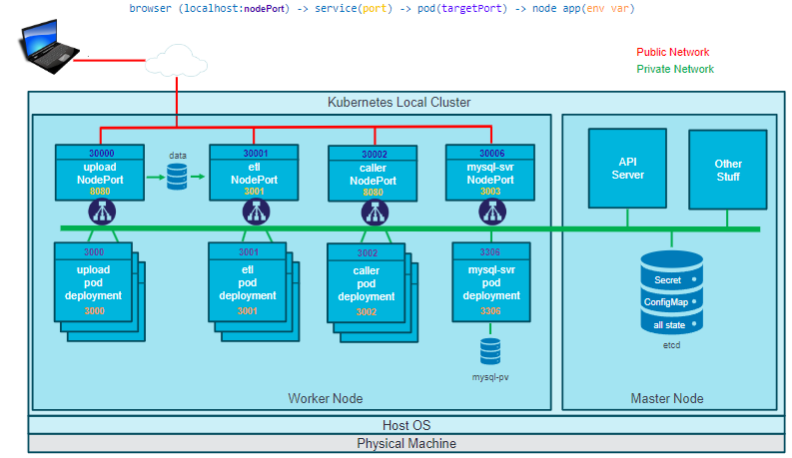
The architecture consists of three key components: A clusters, nodes, and a pod.
A Cluster
This encapsulates all other components.
Nodes
These are typically VMs. There is a master node (control plane) that controls worker nodes.
A Pod
A pod lives on a node - there are several. A pod is an abstraction of a container.
So finally, a worker node, is a VM which we deploy pods, and inside a pod is typically a single container.
The master node is responsible for deploying and managing pods on a node. As a VM (or the physical machine) is a SPOF (single point of failure), the master is capable of creating and managing multiple pods across multiple nodes across multiple AZs for high availability and resilience. The master can detect it, delete it and create a new one.
Using a Cluster Autoscaler open source component, K8S can interact with cloud services to create and destroy nodes on demand for higher level scalability.
Kubernetes Benefits
- High availability (no downtime) and resilience
- Elastic scalability - easily and automatically horizontally scale
- Disaster recovery - can backup and restore data
- Load balancing traffic across pods.
- Rolling updates and rollbacks - gradually rolls out update to each pod to avoid downtime
- can set resource limits to prevent containers from consuming excessive resources
- The system architecture, resource limits, etc are declaratively specified in YAML or JSON
- Self-healing - if a pod fails it is automatically detected and a new one is created and the old one deleted.
- The deleted pod is recreated with a different name.
- Works on-premise and in the cloud providers.
- Build-in security - network and pod policies and RBAC.
Kubernetes Objects
Pod
A pod is an abstraction of generally a single container or multiple containers. They are the smallest deployable units of compute that you can create and manage with Kubernetes. Versatile in that they can host a whole application, or part of one.
- K8S decides which node the pod will run on.
- K8S automatically recreates a deleted pod with a different name.
- K8S runs one instance of each pod that is defined, and allocates it a single IP address, even if it hosts more than one container.
Important
Pods themselves are not interacted with directly, as they are ephemeral. E.g. memory leak may cause a pod crash, it is replaced however, the new pod may have a different IP address, so maintenance is difficult. Instead services are interacted with, which then access pods.